Climate DT Parameter - Time Series Plot - Data Access via DEDL HDA
This notebook authenticates users with DestinE services, submits data requests through the DEDL HDA API for Climate Digital Twin projections, monitors the request status, downloads the requested multi-year GRIB datasets, and visualizes the results using EarthKit.
To search and access DEDL data a DestinE user account is needed
To search and access DT data an upgraded access is needed.
Earthkit and Polytope (used from HDA) are both packages provided by the European Centre for Medium-Range Weather Forecasts (ECMWF).
Climate DT Parameter - Time Series Plot - Data Access via DEDL HDA
Contents
Objective: This notebook has the aim to show how to how to use the HDA (Harmonized Data Access) API to query and access Climate DT data to plot a parameter series.
Data Sources: https://
destine .ecmwf .int /climate -change -adaptation -digital -twin -climate -dt/ Methods: The data request is performed using the HDA REST API. The variable used in this notebook is “Time-mean 2 metre temperature”, defined as the mean air temperature at 2 m above the Earth’s surface and expressed in Kelvin (K). In this analysis, the variable is calculated as the average temperature for the month of June and is evaluated over a multi-year period, enabling the comparison of June temperature conditions from year to year. Below are the main steps covered by this tutorial.
Setup: Import the required libraries.
Search: Search for 2 metre temperature.
Order and Download: How to filter and download climate Dt data.
Plot: How to visualize hourly data on single levels data through Earthkit.
Prerequisites:
To search and access DEDL data a DestinE user account is needed
To search and access DT data an upgraded access is needed.
Expected Output:
4 grib file files containing the requested data, deleted in the last cell
4 maps plot of the 2 metre temperature at different years.
Setup
Import all the required packages.
import destinelab as deauth
import json

import requests
from requests.adapters import HTTPAdapter
from urllib3.util.retry import Retry
import os
from getpass import getpass
from tqdm import tqdm
import time
from datetime import datetime
from urllib.parse import unquote
from IPython.display import JSON
import ipywidgets as w
(DEDL-HDA-EO.ECMWF.DAT.DT_CLIMATE-Series.ipynb-Search-for-2- metre-temperature)=
Search for 2 metre temperature
Obtain Authentication Token
To access data we need to be authenticated.
Below how to request of an authentication token using the destinelab package.
DESP_USERNAME = input("Please input your DESP username: ")
DESP_PASSWORD = getpass("Please input your DESP password: ")

auth = deauth.AuthHandler(DESP_USERNAME, DESP_PASSWORD)
access_token = auth.get_token()
if access_token is not None:
    print("DEDL/DESP Access Token Obtained Successfully")
else:
    print("Failed to Obtain DEDL/DESP Access Token")

auth_headers = {"Authorization": f"Bearer {access_token}"}
Please input your DESP username: eum-dedl-user
Please input your DESP password: ········
DEDL/DESP Access Token Obtained Successfully
Response code: 200
DEDL/DESP Access Token Obtained Successfully
Check if DT access is granted
If DT access is not granted, you will not be able to execute the rest of the notebook.
auth.is_DTaccess_allowed(access_token)TrueDeriving Query Parameters from STAC Metadata
The variables available in the selected collection can be retrieved directly from its STAC metadata. Below, we list all parameters along with their relevant information.
HDA Endpoints
HDA API is based on the Spatio Temporal Asset Catalog specification (STAC). When accessing DestinE data through the HDA API, it is useful to define a small set of configuration constants upfront. These typically include:
The STAC API endpoint exposed by HDA
The collection name
While the collection name can be specified as a constant, it does not need to be known in advance, as available collections can be discovered dynamically using the discovery API.
HDA_STAC_ENDPOINT="https://hda.data.destination-earth.eu/stac/v2"
print("STAC endpoint: ", HDA_STAC_ENDPOINT)
STAC endpoint: https://hda.data.destination-earth.eu/stac/v2
HDA_DISCOVERY_ENDPOINT = HDA_STAC_ENDPOINT+'/collections'
print("HDA discovery endpoint: ", HDA_DISCOVERY_ENDPOINT)
HDA discovery endpoint: https://hda.data.destination-earth.eu/stac/v2/collections
HDA Discovery
In this example, we aim to access the latest generation of Climate DT simulations for future projections generated by the IFS-NEMO model.
To identify the appropriate collection ID for querying the HDA, we can leverage the free-text search capability of the HDA Discovery API. For instance, you can search using keywords such as “Climate Change Adaptation Digital Twin”, “Future Projection”, and “IFS-NEMO” and “Generation-2”.
The search results will provide the relevant collection ID, along with additional useful metadata such as the temporal coverage and the available parameters.
discovery_json=(requests.get(HDA_DISCOVERY_ENDPOINT,params = {"q": '"Climate Change Adaptation Digital Twin" AND "Future Projection" AND Generation-2 AND IFS-NEMO'}).json())

print("The discovery result give us:\nthe collection ID : ", discovery_json["collections"][0].get("id"))
print("\nIts time extension : ", discovery_json["collections"][0].get("extent").get("temporal").get("interval"))
#print("\nThe available parameters: ", discovery_json["collections"][0].get("cube:variables").keys())
parameters=discovery_json["collections"][0]["cube:variables"]
print("\nThe available parameters: ")
keys = sorted(parameters)
print(json.dumps(keys, indent=2))
COLLECTION_ID = discovery_json["collections"][0].get("id")
TARGET_COLLECTION_ID ="EO.ECMWF.DAT.D1.DT_CLIMATE.G2.PROJECTIONS_SSP3-7.0_IFS-NEMO.R1"

if COLLECTION_ID != TARGET_COLLECTION_ID:
    print("Target collection not found in discovery response.")
The discovery result give us:
the collection ID :  EO.ECMWF.DAT.D1.DT_CLIMATE.G2.PROJECTIONS_SSP3-7.0_IFS-NEMO.R1

Its time extension :  [['2015-01-01T00:00:00Z', '2049-12-31T23:59:59Z']]

The available parameters:
[
  "10_metre_U_wind_component(clte_sfc)",
  "10_metre_V_wind_component(clte_sfc)",
  "10_metre_wind_speed(clte_sfc)",
  "2_metre_dewpoint_temperature(clte_sfc)",
  "2_metre_temperature(clte_sfc)",
  "Geopotential(clte_pl)",
  "Land-sea_mask(clte_sfc)",
  "Mean_sea_level_pressure(clte_sfc)",
  "Orography(clte_sfc)",
  "Potential_vorticity(clte_pl)",
  "Relative_humidity(clte_pl)",
  "Skin_temperature(clte_sfc)",
  "Snow_depth_water_equivalent(clte_sfc)",
  "Snow_depth_water_equivalent(clte_sol)",
  "Specific_cloud_liquid_water_content(clte_pl)",
  "Specific_humidity(clte_pl)",
  "Surface_pressure(clte_sfc)",
  "Temperature(clte_pl)",
  "Time-mean_10_metre_U_wind_component(clmn_sfc)",
  "Time-mean_10_metre_V_wind_component(clmn_sfc)",
  "Time-mean_10_metre_wind_speed(clmn_sfc)",
  "Time-mean_2_metre_dewpoint_temperature(clmn_sfc)",
  "Time-mean_2_metre_temperature(clmn_sfc)",
  "Time-mean_U_component_of_wind(clmn_hl)",
  "Time-mean_U_component_of_wind(clmn_pl)",
  "Time-mean_V_component_of_wind(clmn_hl)",
  "Time-mean_V_component_of_wind(clmn_pl)",
  "Time-mean_eastward_sea_ice_velocity(clmn_o2d)",
  "Time-mean_eastward_sea_ice_velocity(clte_o2d)",
  "Time-mean_eastward_sea_water_velocity(clmn_o3d)",
  "Time-mean_eastward_sea_water_velocity(clte_o3d)",
  "Time-mean_eastward_turbulent_surface_stress(clmn_sfc)",
  "Time-mean_eastward_turbulent_surface_stress(clte_sfc)",
  "Time-mean_geopotential(clmn_pl)",
  "Time-mean_mean_sea_level_pressure(clmn_sfc)",
  "Time-mean_moisture_flux(clmn_sfc)",
  "Time-mean_moisture_flux(clte_sfc)",
  "Time-mean_northward_sea_ice_velocity(clmn_o2d)",
  "Time-mean_northward_sea_ice_velocity(clte_o2d)",
  "Time-mean_northward_sea_water_velocity(clmn_o3d)",
  "Time-mean_northward_sea_water_velocity(clte_o3d)",
  "Time-mean_northward_turbulent_surface_stress(clmn_sfc)",
  "Time-mean_northward_turbulent_surface_stress(clte_sfc)",
  "Time-mean_potential_vorticity(clmn_pl)",
  "Time-mean_relative_humidity(clmn_pl)",
  "Time-mean_sea_ice_area_fraction(clmn_o2d)",
  "Time-mean_sea_ice_area_fraction(clte_o2d)",
  "Time-mean_sea_ice_thickness(clmn_o2d)",
  "Time-mean_sea_ice_thickness(clte_o2d)",
  "Time-mean_sea_ice_volume_per_unit_area(clmn_o2d)",
  "Time-mean_sea_ice_volume_per_unit_area(clte_o2d)",
  "Time-mean_sea_surface_height(clmn_o2d)",
  "Time-mean_sea_surface_height(clte_o2d)",
  "Time-mean_sea_surface_practical_salinity(clmn_o2d)",
  "Time-mean_sea_surface_practical_salinity(clte_o2d)",
  "Time-mean_sea_surface_temperature(clmn_o2d)",
  "Time-mean_sea_surface_temperature(clte_o2d)",
  "Time-mean_sea_water_potential_temperature(clmn_o3d)",
  "Time-mean_sea_water_potential_temperature(clte_o3d)",
  "Time-mean_sea_water_practical_salinity(clmn_o3d)",
  "Time-mean_sea_water_practical_salinity(clte_o3d)",
  "Time-mean_skin_temperature(clmn_sfc)",
  "Time-mean_snow_depth_water_equivalent(clmn_sfc)",
  "Time-mean_snow_depth_water_equivalent(clmn_sol)",
  "Time-mean_snow_volume_over_sea_ice_per_unit_area(clmn_o2d)",
  "Time-mean_snow_volume_over_sea_ice_per_unit_area(clte_o2d)",
  "Time-mean_specific_cloud_liquid_water_content(clmn_pl)",
  "Time-mean_specific_humidity(clmn_pl)",
  "Time-mean_sub-surface_runoff_rate(clmn_sfc)",
  "Time-mean_sub-surface_runoff_rate(clte_sfc)",
  "Time-mean_surface_downward_long-wave_radiation_flux(clmn_sfc)",
  "Time-mean_surface_downward_long-wave_radiation_flux(clte_sfc)",
  "Time-mean_surface_downward_short-wave_radiation_flux(clmn_sfc)",
  "Time-mean_surface_downward_short-wave_radiation_flux(clte_sfc)",
  "Time-mean_surface_latent_heat_flux(clmn_sfc)",
  "Time-mean_surface_latent_heat_flux(clte_sfc)",
  "Time-mean_surface_net_long-wave_radiation_flux(clmn_sfc)",
  "Time-mean_surface_net_long-wave_radiation_flux(clte_sfc)",
  "Time-mean_surface_net_long-wave_radiation_flux,_clear_sky(clmn_sfc)",
  "Time-mean_surface_net_long-wave_radiation_flux,_clear_sky(clte_sfc)",
  "Time-mean_surface_net_short-wave_radiation_flux(clmn_sfc)",
  "Time-mean_surface_net_short-wave_radiation_flux(clte_sfc)",
  "Time-mean_surface_net_short-wave_radiation_flux,_clear_sky(clmn_sfc)",
  "Time-mean_surface_net_short-wave_radiation_flux,_clear_sky(clte_sfc)",
  "Time-mean_surface_pressure(clmn_sfc)",
  "Time-mean_surface_runoff_rate(clmn_sfc)",
  "Time-mean_surface_runoff_rate(clte_sfc)",
  "Time-mean_surface_sensible_heat_flux(clmn_sfc)",
  "Time-mean_surface_sensible_heat_flux(clte_sfc)",
  "Time-mean_temperature(clmn_pl)",
  "Time-mean_top_net_long-wave_radiation_flux(clmn_sfc)",
  "Time-mean_top_net_long-wave_radiation_flux(clte_sfc)",
  "Time-mean_top_net_long-wave_radiation_flux,_clear_sky(clmn_sfc)",
  "Time-mean_top_net_long-wave_radiation_flux,_clear_sky(clte_sfc)",
  "Time-mean_top_net_short-wave_radiation_flux(clmn_sfc)",
  "Time-mean_top_net_short-wave_radiation_flux(clte_sfc)",
  "Time-mean_top_net_short-wave_radiation_flux,_clear_sky(clmn_sfc)",
  "Time-mean_top_net_short-wave_radiation_flux,_clear_sky(clte_sfc)",
  "Time-mean_total_cloud_cover(clmn_sfc)",
  "Time-mean_total_column_cloud_ice_water(clmn_sfc)",
  "Time-mean_total_column_heat_content(clmn_o2d)",
  "Time-mean_total_column_heat_content(clte_o2d)",
  "Time-mean_total_column_liquid_water(clmn_sfc)",
  "Time-mean_total_column_vertically-integrated_water_vapour(clmn_sfc)",
  "Time-mean_total_column_water(clmn_sfc)",
  "Time-mean_total_precipitation_rate(clmn_sfc)",
  "Time-mean_total_precipitation_rate(clte_sfc)",
  "Time-mean_total_snowfall_rate_water_equivalent(clmn_sfc)",
  "Time-mean_total_snowfall_rate_water_equivalent(clte_sfc)",
  "Time-mean_upward_sea_water_velocity(clmn_o3d)",
  "Time-mean_upward_sea_water_velocity(clte_o3d)",
  "Time-mean_vertical_velocity(clmn_pl)",
  "Time-mean_vertically-integrated_heat_content_in_the_upper_300_m(clmn_o2d)",
  "Time-mean_vertically-integrated_heat_content_in_the_upper_300_m(clte_o2d)",
  "Time-mean_vertically-integrated_heat_content_in_the_upper_700_m(clmn_o2d)",
  "Time-mean_vertically-integrated_heat_content_in_the_upper_700_m(clte_o2d)",
  "Time-mean_volumetric_soil_moisture(clmn_sol)",
  "Time_mean_top_downward_short-wave_radiation_flux(clmn_sfc)",
  "Time_mean_top_downward_short-wave_radiation_flux(clte_sfc)",
  "Total_Cloud_Cover(clte_sfc)",
  "Total_column_cloud_ice_water(clte_sfc)",
  "Total_column_cloud_liquid_water(clte_sfc)",
  "Total_column_vertically-integrated_water_vapour(clte_sfc)",
  "Total_column_water(clte_sfc)",
  "U_component_of_wind(clte_hl)",
  "U_component_of_wind(clte_pl)",
  "V_component_of_wind(clte_hl)",
  "V_component_of_wind(clte_pl)",
  "Vertical_velocity(clte_pl)",
  "Volumetric_soil_moisture(clte_sol)"
]
From the list of available parameters, we select *“Time-mean 2 metre temperature”**, defined as the mean air temperature at 2 m above the Earth’s surface (levtype = sfc).
Using the metadata, we can extract the information required to formulate the HDA query and retrieve the desired product.
for var_name, var_info in parameters.items():
    if var_name=="Time-mean_2_metre_temperature(clmn_sfc)":
        var_type = var_info.get("type")
        var_unit = var_info.get("unit")
        var_url = var_info.get("attrs").get("url")

        two_metre_temperature = {
            "type": var_type,
            "unit": var_unit,
            "long_name": var_info.get("attrs").get("long_name"),
            "shortName": var_info.get("attrs").get("shortName"),
            "standard_name": var_info.get("attrs").get("standard_name"),
            "stream": var_info.get("attrs").get("stream"),
            "url": var_url,
            "parameter_ID": var_info.get("attrs").get("parameter_ID"),
            "product_type": var_info.get("attrs").get("product_type"),
            "levtype": var_info.get("attrs").get("levtype"),
            "levelist": var_info.get("attrs").get("levelist"),
            "time": var_info.get("attrs").get("time")
        }
two_metre_temperature
{'type': 'data',
'unit': 'K',
'long_name': 'Time-mean 2 metre temperature',
'shortName': 'avg_2t',
'standard_name': 'Time-mean_2_metre_temperature',
'stream': 'clmn',
'url': 'https://codes.ecmwf.int/grib/param-db/228004',
'parameter_ID': '228004',
'product_type': 'forecast',
'levtype': 'sfc',
'levelist': '2',
'time': 'Monthly'}Below we request the average temperature for the month of June evaluated over a multi-year period from 2020 to 2035
response = requests.post(HDA_STAC_ENDPOINT+"/search", headers=auth_headers, json={
 "collections": [COLLECTION_ID],
    "query":  {
    "ecmwf:resolution":{"eq": "high"},
    "ecmwf:levtype":{"eq": two_metre_temperature["levtype"]},
    "ecmwf:levelist":{"eq": [two_metre_temperature["levelist"]]},
    "ecmwf:stream":{"eq": two_metre_temperature["stream"]},
    "ecmwf:month":{"eq": ["6"]},
    "ecmwf:year":{"eq": ["2020","2025","2030","2035"]},
    "ecmwf:param":{"eq": [two_metre_temperature["parameter_ID"]]}
    }
})
if(response.status_code!= 200):
(print(response.text))
response.raise_for_status()
product = response.json()["features"][0]
#JSON(product)
print(json.dumps(product,indent=4)){
"type": "Feature",
"assets": {},
"id": "DT_CLIMATE_G2_PROJECTIONS_SSP3_7_0_IFS_NEMO_R1_ORDERABLE_8ce10952854c3edd69a8e98070d475c3fd6148af",
"geometry": {
"type": "Polygon",
"coordinates": [
[
[
180.0,
-90.0
],
[
180.0,
90.0
],
[
-180.0,
90.0
],
[
-180.0,
-90.0
],
[
180.0,
-90.0
]
]
]
},
"bbox": [
-180.0,
-90.0,
180.0,
90.0
],
"collection": "EO.ECMWF.DAT.D1.DT_CLIMATE.G2.PROJECTIONS_SSP3-7.0_IFS-NEMO.R1",
"stac_version": "1.1.0",
"properties": {
"datetime": "2020-06-01T00:00:00.000Z",
"end_datetime": "2035-06-30T23:59:59.000Z",
"start_datetime": "2020-06-01T00:00:00.000Z",
"title": "DT_CLIMATE_G2_PROJECTIONS_SSP3_7_0_IFS_NEMO_R1_ORDERABLE_8ce10952854c3edd69a8e98070d475c3fd6148af",
"ecmwf:activity": "projections",
"ecmwf:class": "d1",
"ecmwf:dataset": "climate-dt",
"ecmwf:experiment": "SSP3-7.0",
"ecmwf:expver": "0001",
"ecmwf:generation": "2",
"ecmwf:levelist": [
"2"
],
"ecmwf:levtype": "sfc",
"ecmwf:model": "IFS-NEMO",
"ecmwf:month": [
"6"
],
"ecmwf:param": [
"228004"
],
"ecmwf:realization": "1",
"ecmwf:resolution": "high",
"ecmwf:stream": "clmn",
"ecmwf:type": "fc",
"ecmwf:year": [
"2020",
"2025",
"2030",
"2035"
],
"order:status": "orderable",
"product:type": "climate-dt",
"federation:backends": [
"dedt_mn5"
],
"providers": [
{
"name": "dedt_mn5",
"roles": [
"host"
]
}
]
},
"stac_extensions": [
"https://stac-extensions.github.io/product/v1.0.0/schema.json",
"https://stac-extensions.github.io/order/v1.1.0/schema.json"
],
"links": [
{
"rel": "retrieve",
"type": "application/geo+json",
"href": "https://hda.data.destination-earth.eu/stac/v2/collections/EO.ECMWF.DAT.D1.DT_CLIMATE.G2.PROJECTIONS_SSP3-7.0_IFS-NEMO.R1/order",
"method": "POST",
"title": "Retrieve",
"body": {
"activity": "projections",
"class": "d1",
"dataset": "climate-dt",
"experiment": "SSP3-7.0",
"expver": "0001",
"generation": "2",
"levelist": [
"2"
],
"levtype": "sfc",
"model": "IFS-NEMO",
"month": [
"6"
],
"param": [
"228004"
],
"realization": "1",
"resolution": "high",
"stream": "clmn",
"type": "fc",
"year": [
"2020",
"2025",
"2030",
"2035"
]
}
},
{
"rel": "collection",
"type": "application/json",
"href": "https://hda.data.destination-earth.eu/stac/v2/collections/EO.ECMWF.DAT.D1.DT_CLIMATE.G2.PROJECTIONS_SSP3-7.0_IFS-NEMO.R1",
"title": "Climate Change Adaptation Digital Twin (Climate Adaptation DT) - Future Projection - IFS-NEMO - Generation-2 - Realization-1"
},
{
"rel": "self",
"type": "application/geo+json",
"href": "https://hda.data.destination-earth.eu/stac/v2/collections/EO.ECMWF.DAT.D1.DT_CLIMATE.G2.PROJECTIONS_SSP3-7.0_IFS-NEMO.R1/items/DT_CLIMATE_G2_PROJECTIONS_SSP3_7_0_IFS_NEMO_R1_ORDERABLE_8ce10952854c3edd69a8e98070d475c3fd6148af",
"title": "Original item link"
}
]
}
Order and Download
We want to retrieve the June monthly mean temperature for a set of years spaced at five-year intervals between 2020 and 2035.
The previous search response provides all the information required to place a data order, including the request URL and payload.
To access the data, an order processed asynchronously by the service; once a request has been completed and the product is available, it can be downloaded.
link = next((l for l in product.get('links', []) if l.get("rel") == "retrieve"), None)

if link:
    href = link.get("href")
    body = link.get("body")   # optional: depends on extension
    print("order endpoint:", href)
    print("order body, same as the polytope format:")
    print(json.dumps(body, indent=4))
else:
    print(f"No link with rel='{target_rel}' found")
order endpoint: https://hda.data.destination-earth.eu/stac/v2/collections/EO.ECMWF.DAT.D1.DT_CLIMATE.G2.PROJECTIONS_SSP3-7.0_IFS-NEMO.R1/order
order body, same as the polytope format:
{
    "activity": "projections",
    "class": "d1",
    "dataset": "climate-dt",
    "experiment": "SSP3-7.0",
    "expver": "0001",
    "generation": "2",
    "levelist": [
        "2"
    ],
    "levtype": "sfc",
    "model": "IFS-NEMO",
    "month": [
        "6"
    ],
    "param": [
        "228004"
    ],
    "realization": "1",
    "resolution": "high",
    "stream": "clmn",
    "type": "fc",
    "year": [
        "2020",
        "2025",
        "2030",
        "2035"
    ]
}
To loop on years we need to modify the date in the order body amd then order and download.
#Sometimes requests to polytope get timeouts, it is then convenient define a retry strategy
retry_strategy = Retry(
    total=5,  # Total number of retries
    status_forcelist=[500, 502, 503, 504],  # List of 5xx status codes to retry on
    allowed_methods=["GET",'POST'],  # Methods to retry
    backoff_factor=1  # Wait time between retries (exponential backoff)
)

# Create an adapter with the retry strategy
adapter = HTTPAdapter(max_retries=retry_strategy)

# Create a session and mount the adapter
session = requests.Session()
session.mount("https://", adapter)
TIMEOUT = 300
STEP = 1
ORDER_STATUS = "succeeded"
response = session.post(href, json=body, headers=auth_headers)
if response.status_code != 200:
print(response.content)
response.raise_for_status()
ordered_item = response.json()
product_id = ordered_item["id"]
storage_tier = ordered_item["properties"].get("storage:tier", "online")
order_status = ordered_item["properties"].get("order:status", "unknown")
federation_backend = ordered_item["properties"].get("federation:backends", [None])[0]
print(f"Product ordered: {product_id}")
print(f"Provider: {federation_backend}")
print(f"Order status: {order_status}")
self_url = f"{HDA_STAC_ENDPOINT}/collections/{COLLECTION_ID}/items/{product_id}"
item = {}
for i in range(0, TIMEOUT, STEP):
print(f"Polling {i + 1}/{TIMEOUT // STEP}")
response = session.get(self_url, headers=auth_headers)
if response.status_code != 200:
print(response.content)
response.raise_for_status()
item = response.json()
print(item["properties"].get("order:status"))
status = item["properties"].get("order:status")
if status == ORDER_STATUS:
download_url = item["assets"]["downloadLink"]["href"]
print("Product is ready to be downloaded.")
print(f"Asset URL: {download_url}")
break
time.sleep(STEP)
else:
order_status = item["properties"].get("order:status", "unknown")
print(f"We could not download the product after {TIMEOUT // STEP} tries. Current order status is {order_status}")
response = session.get(download_url, stream=True, headers=auth_headers)
response.raise_for_status()
content_disposition = response.headers.get('Content-Disposition')
total_size = int(response.headers.get("content-length", 0))
if content_disposition:
filename = content_disposition.split('filename=')[1].split('"')[1]
else:
filename = os.path.basename(url)
# Open a local file in binary write mode and write the content
print(f"downloading {filename}")
with tqdm(total=total_size, unit="B", unit_scale=True) as progress_bar:
with open(filename, 'wb') as f:
for data in response.iter_content(1024):
progress_bar.update(len(data))
f.write(data)Product ordered: 01f3z8k9835e7cg007vma02eav
Provider: dedt_mn5
Order status: succeeded
Polling 1/300
succeeded
Product is ready to be downloaded.
Asset URL: https://hda-download.central.data.destination-earth.eu/data/dedt_mn5/EO.ECMWF.DAT.D1.DT_CLIMATE.G2.PROJECTIONS_SSP3-7.0_IFS-NEMO.R1/01f3z8k9835e7cg007vma02eav/downloadLink
downloading 01f3z8k9835e7cg007vma02eav.grib
95.9MB [01:59, 799kB/s]
EarthKit
Using EarthKit, we can seamlessly load and visualize the requested datasets, facilitating both data exploration and result validation. The retrieved dataset has global coverage, while the displayed map highlights the region over Spain.
import earthkit.data
import earthkit.plots
import earthkit.regrid

data = earthkit.data.from_source("file", filename)
earthkit.plots.quickplot(data,domain="Spain")
Regrid specs: in_grid={'grid': 'H1024', 'ordering': 'nested'}, out_grid={'grid': [0.1, 0.1]}
Regrid specs: in_grid={'grid': 'H1024', 'ordering': 'nested'}, out_grid={'grid': [0.1, 0.1]}
Regrid specs: in_grid={'grid': 'H1024', 'ordering': 'nested'}, out_grid={'grid': [0.1, 0.1]}
Regrid specs: in_grid={'grid': 'H1024', 'ordering': 'nested'}, out_grid={'grid': [0.1, 0.1]}
<earthkit.plots.components.figures.Figure at 0x7f204ff53b10>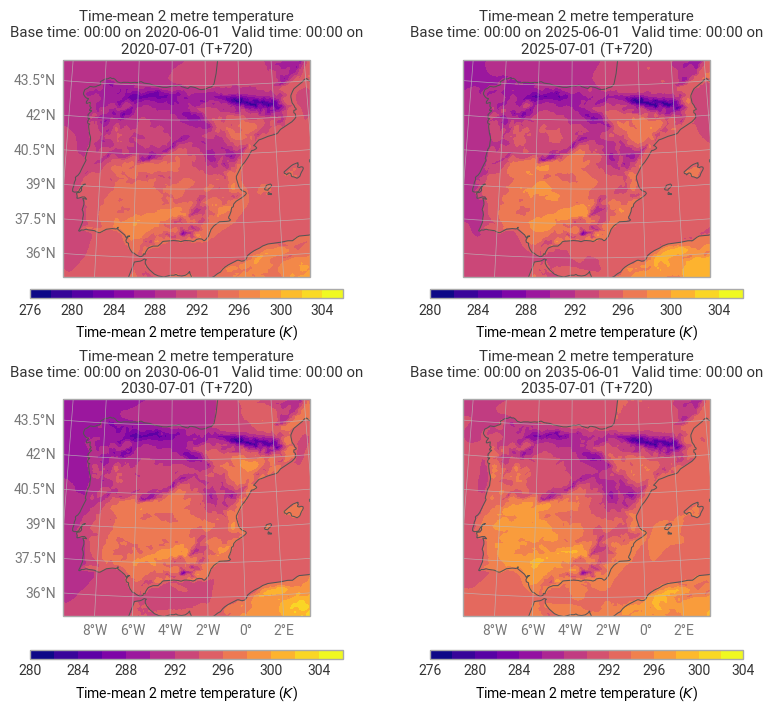
os.remove(filename)