Author: EUMETSAT
Copyright: 2024 EUMETSAT
Licence: MIT
Destination Earth - Climate Change Adaptation Digital Twin - Data Access using DEDL HDA#
Documentation DestinE Data Lake HDA
Climate DT overview (for DESP testing period)
Author: EUMETSAT
Credit: Earthkit and HDA Polytope used in this context are both packages provided by the European Centre for Medium-Range Weather Forecasts (ECMWF).
DEDL Harmonised Data Access is used in this example.
Obtain Authentication Token#
pip install --quiet --upgrade destinelab
Note: you may need to restart the kernel to use updated packages.
import requests
from requests.adapters import HTTPAdapter
from urllib3.util.retry import Retry
import json
import os
from getpass import getpass
import destinelab as deauth

import importlib.metadata
First, we get an access token for the API
DESP_USERNAME = input("Please input your DESP username or email: ")
DESP_PASSWORD = getpass("Please input your DESP password: ")

auth = deauth.AuthHandler(DESP_USERNAME, DESP_PASSWORD)
access_token = auth.get_token()
if access_token is not None:
    print("DEDL/DESP Access Token Obtained Successfully")
else:
    print("Failed to Obtain DEDL/DESP Access Token")

auth_headers = {"Authorization": f"Bearer {access_token}"}
Response code: 200
DEDL/DESP Access Token Obtained Successfully
Check if DT access is granted#
If DT access is not granted, you will not be able to execute the rest of the notebook.
installed_version = importlib.metadata.version("destinelab")
version_number = installed_version.split('.')[1]
if(int(version_number) >= 8):
    auth.is_DTaccess_allowed(access_token)
DT Output access allowed
Query using the DEDL HDA API#
Filter#
We have to setup up a filter and define which data to obtain.
Choose a valid combination of => Activity + Experiment + Model (based on the year of interest)
Following activities/experiment/model & dates are possible:
ScenarioMIP/ssp3-7.0/ICON: Start date 20200101, 40 years
ScenarioMIP/ssp3-7.0/IFS-NEMO: Start date 20200101, 40 years
datechoice = "2028-06-10T00:00:00Z"
filters = {
    key: {"eq": value}
    for key, value in {
        "class": "d1",             # fixed
        "dataset": "climate-dt",   # fixed climate-dt access
        "activity": "ScenarioMIP", # activity + experiment + model (go together)
        "experiment": "SSP3-7.0",  # activity + experiment + model (go together)
        "model": "IFS-NEMO",       # activity + experiment + model (go together)
        "generation": "1",         # fixed Specifies the generation of the dataset, which can be incremented as required (latest is 1)
        "realization": "1",        # fixed Specifies the climate realization. Default 1. Based on perturbations of initial conditions
        "resolution": "high",      # standard/ high
        "expver": "0001",          # fixed experiment version
        "stream": "clte",          # fixed climate
        "time": "0000",            # choose the hourly slot(s)
        "type": "fc",              # fixed forecasted fields
        "levtype": "sfc",          # Surface fields (levtype=sfc), Height level fields (levtype=hl), Pressure level fields (levtype=pl), Model Level (Levtype=ml)
#        "levelist": "1/2/3/...",  # for ml/pl/sol type data
        "param": "134"             # Surface Pressure parameter
    }.items()
}
Make Data Request#
#Sometimes requests to polytope get timeouts, it is then convenient define a retry strategy
retry_strategy = Retry(
    total=5,  # Total number of retries
    status_forcelist=[500, 502, 503, 504],  # List of 5xx status codes to retry on
    allowed_methods=["GET",'POST'],  # Methods to retry
    backoff_factor=1  # Wait time between retries (exponential backoff)
)

# Create an adapter with the retry strategy
adapter = HTTPAdapter(max_retries=retry_strategy)

# Create a session and mount the adapter
session = requests.Session()
session.mount("https://", adapter)

response = session.post("https://hda.data.destination-earth.eu/stac/search", headers=auth_headers, json={
 "collections": ["EO.ECMWF.DAT.DT_CLIMATE_ADAPTATION"],
    "datetime": datechoice,
    "query": filters
})

if(response.status_code!= 200):
    (print(response.text))
response.raise_for_status()

# Requests to EO.ECMWF.DAT.DT_CLIMATE always return a single item containing all the requested data
product = response.json()["features"][0]
product["id"]
'DT_CLIMATE_ADAPTATION_20280610_20280610_4d9849fd49038b27fb219cdfa53adf24d19b2cd8'
Submission worked ? Once our product found, we download the data.#
from IPython.display import JSON

# DownloadLink is an asset representing the whole product
download_url = product["assets"]["downloadLink"]["href"]
HTTP_SUCCESS_CODE = 200
HTTP_ACCEPTED_CODE = 202

direct_download_url=''

response = session.get(download_url, headers=auth_headers)
if (response.status_code == HTTP_SUCCESS_CODE):
    direct_download_url = product['assets']['downloadLink']['href']
elif (response.status_code != HTTP_ACCEPTED_CODE):
    print(response.text)
print(download_url)
response.raise_for_status()
https://hda.data.destination-earth.eu/stac/collections/EO.ECMWF.DAT.DT_CLIMATE_ADAPTATION/items/DT_CLIMATE_ADAPTATION_20280610_20280610_4d9849fd49038b27fb219cdfa53adf24d19b2cd8/download?provider=dedt_lumi&_dc_qs=%257B%2522activity%2522%253A%2B%2522ScenarioMIP%2522%252C%2B%2522class%2522%253A%2B%2522d1%2522%252C%2B%2522dataset%2522%253A%2B%2522climate-dt%2522%252C%2B%2522date%2522%253A%2B%252220280610%252Fto%252F20280610%2522%252C%2B%2522experiment%2522%253A%2B%2522SSP3-7.0%2522%252C%2B%2522expver%2522%253A%2B%25220001%2522%252C%2B%2522generation%2522%253A%2B1%252C%2B%2522levtype%2522%253A%2B%2522sfc%2522%252C%2B%2522model%2522%253A%2B%2522IFS-NEMO%2522%252C%2B%2522param%2522%253A%2B134%252C%2B%2522realization%2522%253A%2B1%252C%2B%2522resolution%2522%253A%2B%2522high%2522%252C%2B%2522stream%2522%253A%2B%2522clte%2522%252C%2B%2522time%2522%253A%2B0%252C%2B%2522type%2522%253A%2B%2522fc%2522%257D
Wait until data is there#
This data is not available at the moment. And we can see that our request is in queuedstatus.
We will now poll the API until the data is ready and then download it.
from tqdm import tqdm
import time
import re

# we poll as long as the data is not ready
if direct_download_url=='':
    while url := response.headers.get("Location"):
        print(f"order status: {response.json()['status']}")
        response = session.get(url, headers=auth_headers, stream=True)

if (response.status_code not in (HTTP_SUCCESS_CODE,HTTP_ACCEPTED_CODE)):
     (print(response.text))

# Check if Content-Disposition header is present
if "Content-Disposition" not in response.headers:
    print(response)
    print(response.text)
    raise Exception("Headers: \n"+str(response.headers)+"\nContent-Disposition header not found in response. Must be something wrong.")

filename = re.findall('filename=\"?(.+)\"?', response.headers["Content-Disposition"])[0]
total_size = int(response.headers.get("content-length", 0))

print(f"downloading {filename}")

with tqdm(total=total_size, unit="B", unit_scale=True) as progress_bar:
    with open(filename, 'wb') as f:
        for data in response.iter_content(1024):
            progress_bar.update(len(data))
            f.write(data)
order status: queued
downloading 94430a12-4fb7-4af4-8b3a-d23287a25872.grib
100%|██████████| 23.6M/23.6M [00:00<00:00, 54.5MB/s]
EarthKit#
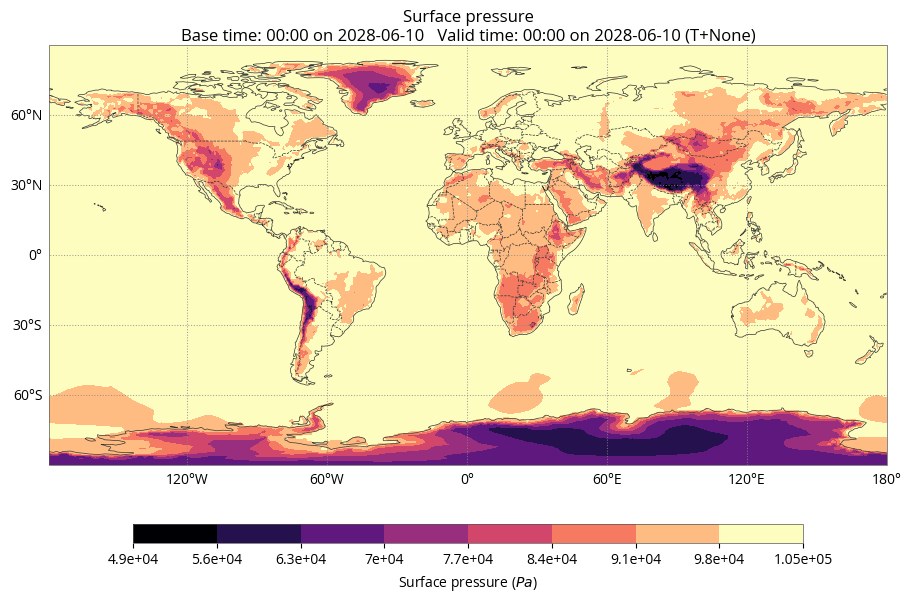
Lets plot the result file [EarthKit Documentation] https://earthkit-data.readthedocs.io/en/latest/index.html
This section requires that you have ecCodes >= 2.35 installed on your system.
You can follow the installation procedure at https://confluence.ecmwf.int/display/ECC/ecCodes+installation
import earthkit.data
import earthkit.maps
import earthkit.regrid
data = earthkit.data.from_source("file", filename)
data.ls
earthkit.maps.quickplot(data,#style=style
                       )